Desktop app for CS2 traders

Your CS2 trading desk, on autopilot.

SkinsMaster bids on skins when the numbers work, lists and reprices what you win, and tracks every item from purchase to payout. One app, every Steam account you run.

Free plan runs on simulated bids. No card needed.

SkinsMaster

Skin Ledger

This week
Invested
$1,284.60
Profit after fees
+$162.37
In trade hold
11 items
ItemPaidProfitTradable
★ Hand Wraps | SlaughterBattle-Scarred · 0.8214 $160.49+11.9% 5d 15:15:00
AK-47 | Consequence of the JinnField-Tested · 0.2231 $131.95+10.3% 3d 14:48:00
M4A4 | The BattlestarField-Tested · 0.1893 $29.02+11.4% Listed
Galil AR | CerberusBattle-Scarred · 0.5127 $15.79+14.2% 1d 02:27:00
Sold on MarketCSGOM4A4 | The Battlestar (FT) · $35.91
Works with CSGOEmpire MarketCSGO DMarket Steam
What it does

Buy, sell and track, without living in six browser tabs.

Trading skins by hand means refreshing auctions, checking prices on other sites and doing fee maths in a spreadsheet. SkinsMaster does the watching and the arithmetic, and leaves the decisions that matter to you.

Buying

Bids for you, only when it pays

SkinsMaster watches CSGOEmpire auctions as they happen and prices each item against where you'll actually sell it. It bids when the margin clears your target after fees, and walks away when it doesn't.

  • Live auction monitoring
  • Your own profit target
  • Weekly spending limits built in
See the reasoning

Every item it passed on, and why

A bot that isn't bidding looks the same as a bot that's broken. SkinsMaster shows you the other side of the decision: every auction it looked at, what it would have paid, and the reason it walked away, whether that was thin sales history, a price sliding, or a margin a point short.

  • The reason in plain words, not a log file
  • Spot a target set too high in minutes
  • Full history on the bigger plans
Your rules

Filters that make it trade like you

The profit target is one number. Everything else about what the bot will touch is yours to set: a price range to stay inside, names it must never buy, a list it may only buy from, how many copies of one skin to hold, and how liquid an item has to be before its price is trusted.

  • Price range, blocklist and allow list
  • Relaxed, normal or strict on liquidity
  • Float ranges and saved strategies on Expert
Selling

Listed, repriced, and never sold short

List items from your inventory in a few clicks. SkinsMaster keeps them competitive on MarketCSGO and DMarket, and never goes below the floor set by what you paid.

  • Automatic repricing
  • A Windows alert the moment something sells
  • See when trade-held money is ready to withdraw
Tracking

Every skin, from bid to payout

The Skin Ledger records what you paid, counts down each trade hold, and shows real profit once fees are taken off. You see what's working without opening a spreadsheet.

  • Profit after marketplace fees
  • Trade hold countdowns
  • Compare one run of trades with the next
  • Export to CSV for your spreadsheet or accountant
Accounts

All your Steam accounts, one window

Switch between accounts without logging in and out. Each one keeps its own inventory, listings, keys and results, and each can buy or sell on its own.

  • Inventory values at a glance
  • Separate bots per account
  • Link Steam by scanning a QR code
  • One combined profit figure across all of them
Pro and above

Storage units: see what's inside and move items in bulk

CS2 storage units hide their contents behind one item at a time. SkinsMaster connects to CS2 for you, lists every unit with its items and what they're worth, and moves as many as you tick in one go, with no password or Steam Guard code to enter.

  • Every unit's contents and value, priced from MarketCSGO and Buff163
  • Move items in or out in bulk, with progress and a Cancel button
  • Rename units, and search, filter and sort what's inside
  • Items you've listed for sale are protected, and a full unit is caught before anything moves
Expert & Overlord

CSGOEmpire Manual: a second bidding page for the big auctions

Knives and gloves move differently to everyday skins, so they get their own bidding page rather than being squeezed into the same rules. It watches CSGOEmpire's highest-value auctions, prices each one against CSFloat, MarketCSGO and DMarket side by side, and lets you bid, rebid when you're outbid, and stop whenever you choose.

  • Priced against CSFloat, MarketCSGO and DMarket together
  • Rebid as many times as you like, or walk away
  • Every win lands in the Skin Ledger automatically
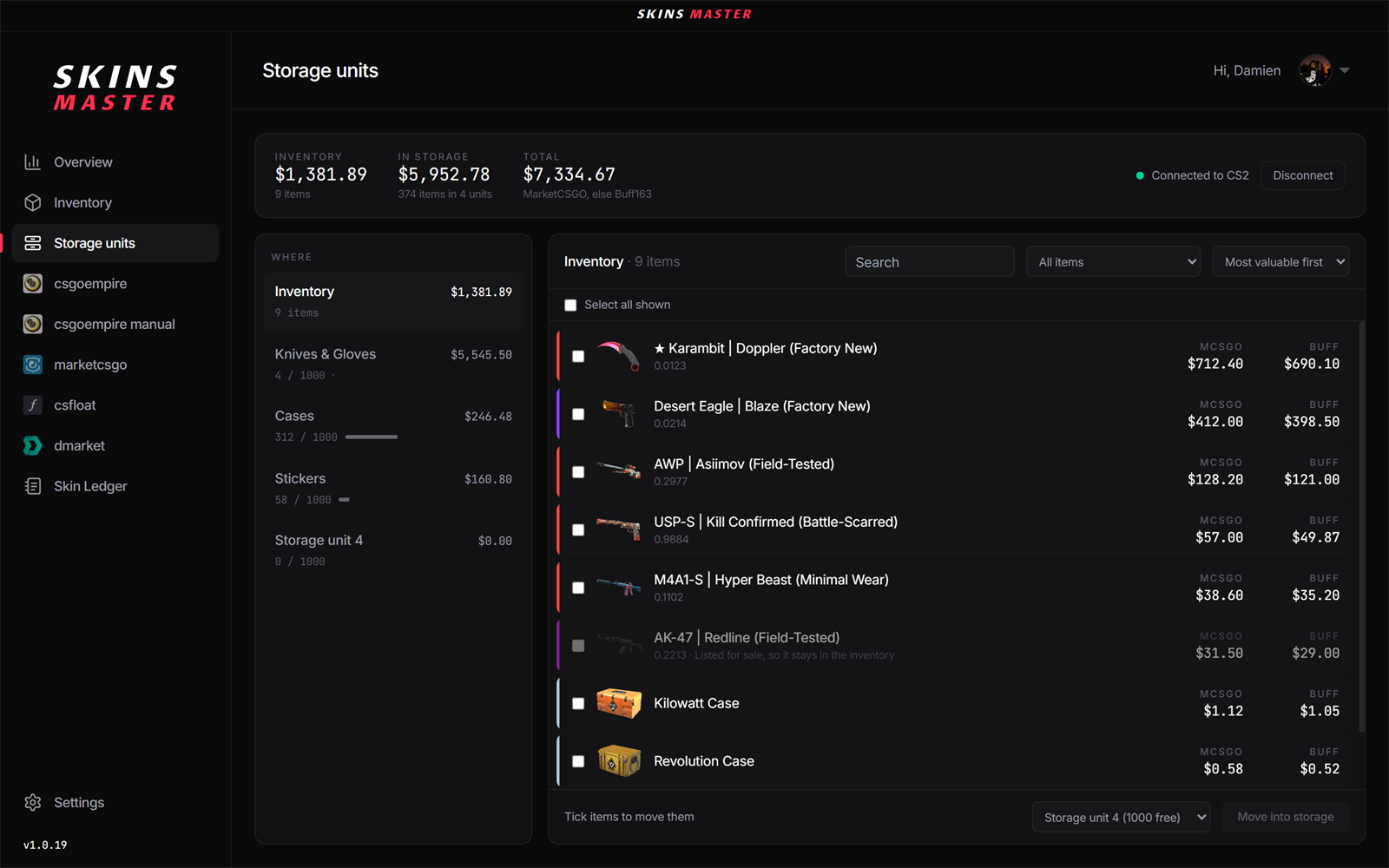
The Storage units page listing four units, how full each is, and the value of the inventory and each unit
All your units at a glance. What's in each one, how full it is, and what it's worth.
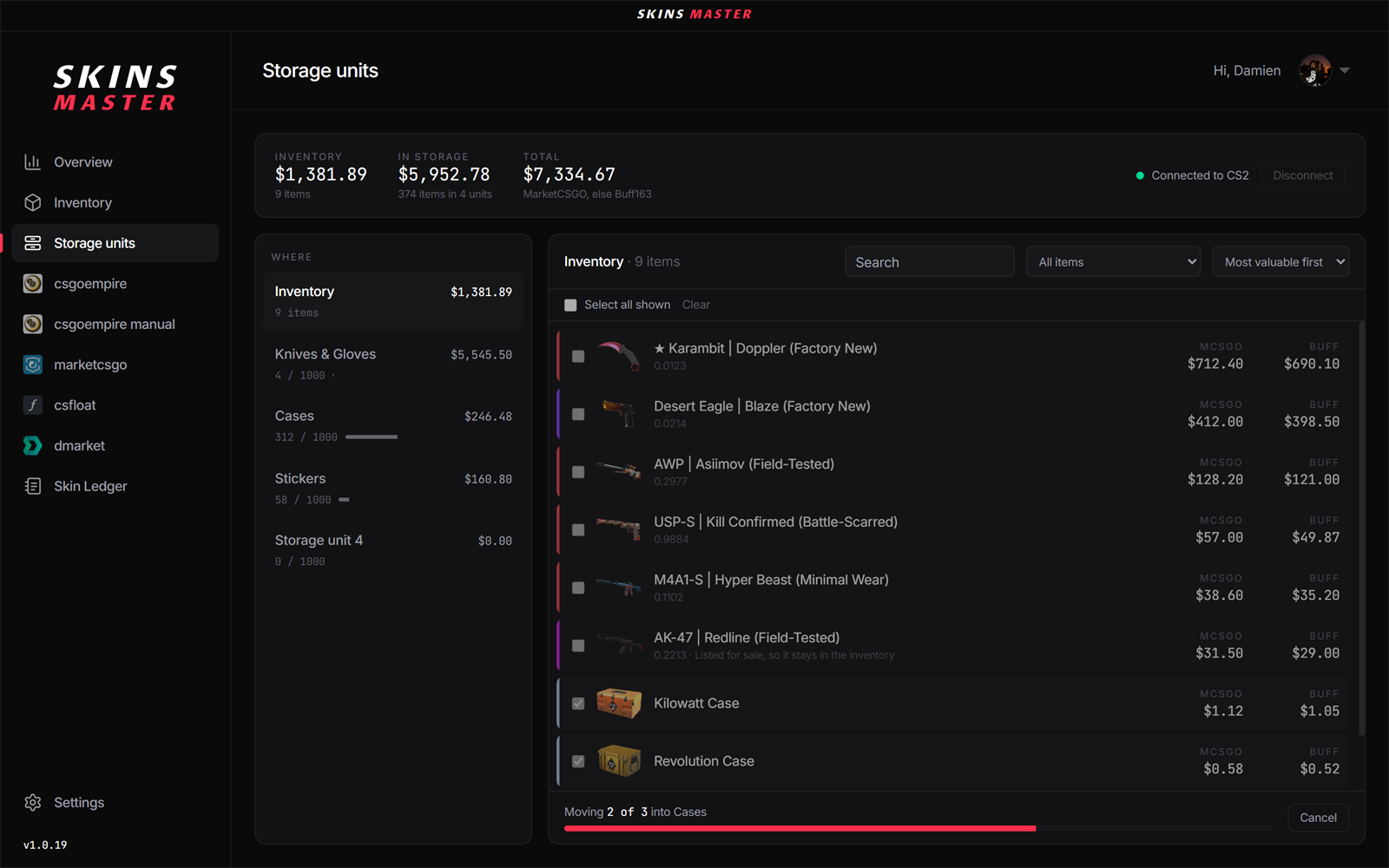
Three cases being moved into a storage unit, with a progress bar and a Cancel button
Tick items, press move. Watch it work, and stop whenever you like.
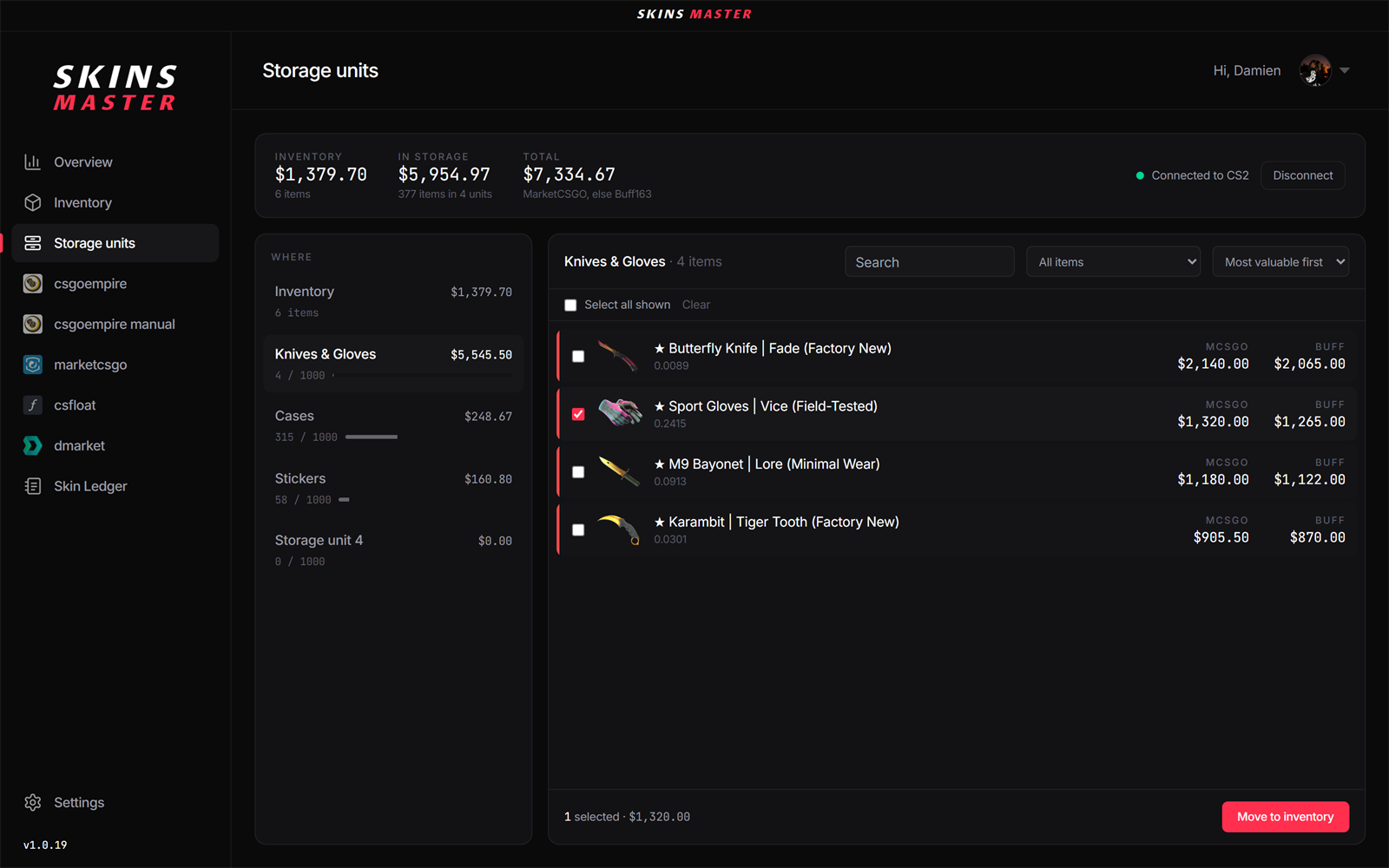
The contents of a storage unit holding knives and gloves, with prices
Open a unit. See every item with its float and price, and pull out what you need.
How it works

Up and running in minutes.

No scripts to install and no servers to rent. SkinsMaster runs on your own PC, and your bots trade while the app is open.

Link your Steam account

Scan a QR code with the Steam app on your phone. SkinsMaster never sees your Steam password.

Add your marketplace keys

Paste the API keys for the marketplaces you use. They're encrypted before they're stored.

Set your target and start

Choose the profit you want, press Start, and follow every bid, sale and payout as it happens.

Plans

Start on simulated bids. Go live when you're ready.

Each plan adds what the one below it doesn't have: more Steam accounts, more marketplaces to reprice on, finer control over what the bot buys, and a bigger weekly budget. Pay for a month, or for a year at 10% off -- and nothing renews without you.

Free

$0forever
$100simulated bids per week
  • See exactly how the bot would trade
  • Skin Ledger and inventory values
  • 1 Steam account
  • Real bids
  • Listing and selling
  • Bidding filters
Start free

Pro

$25/ 30 days
$250spend per week
  • Real bids on CSGOEmpire
  • 2 Steam accounts
  • Auto-repricing on MarketCSGO and DMarket
  • Price band, blocklist and liquidity filters
  • $250 a week for simulated bids
  • CSGOEmpire Manual
See Pro
Recommended

Elite

$50/ 30 days
$500spend per week
  • Everything in Pro
  • 3 Steam accounts
  • CSFloat repricing as well
  • Combined profit across every account
  • Skin Ledger CSV export
  • Faster market data
  • $500 a week for simulated bids
See Elite

Expert

$150/ 30 days
$1,000spend per week
  • Everything in Elite
  • 5 Steam accounts
  • CSGOEmpire Manual for knives and gloves
  • Float ranges and saved strategies
  • Full passed-on history
  • $1,000 a week for simulated bids
See Expert

Overlord

$300/ 30 days
No limiton weekly spend
  • Everything in Expert
  • Unlimited Steam accounts
  • The fastest market data we run
  • Trade at any volume
  • Direct support from us
See Overlord

Buy a paid plan on your account page. The Free plan needs no card, and nothing renews automatically.

Pay by bank or card in rands, at the day's exchange rate Pay with crypto from anywhere
Your accounts, your control

Built so you stay in charge.

Runs on your PCBots trade from your own computer, only while the app is open.
Keys stay encryptedMarketplace API keys are encrypted before they're stored and never shown in full anywhere, not even in our own tools.
Limits you can seeYour weekly spend is always visible, and bidding pauses the moment you hit your plan's limit.
Does SkinsMaster guarantee a profit?

No. Skin prices move, and Steam's trade hold means you can't sell an item for several days after you buy it. SkinsMaster only bids when an item clears your target at today's prices, and the Skin Ledger shows your real results, so you always know where you stand.

Which marketplaces does it work with?

SkinsMaster buys on CSGOEmpire and sells on MarketCSGO and DMarket. You need an account and an API key for each marketplace you want to use.

What happens when I reach my weekly limit?

Bidding pauses until the limit resets on Monday at 09:00 South African time. Anything you're already selling keeps selling.

How do I buy a plan?

Sign in on your account page, pick a plan and pay by card, Ozow instant EFT, Apple Pay or crypto. The plan starts as soon as the payment clears and the app picks it up by itself. Nothing renews automatically: when a plan ends you're back on Free until you buy again.

How many Steam accounts can I use?

One on Free, two on Pro, three on Elite, five on Expert and as many as you like on Overlord. Each account keeps its own inventory, listings, keys and bots, and the bigger plans add one combined profit figure across all of them.

How much can I change about what it buys?

On Free, the profit target. From Pro up you also set a price range, a list of names it must never buy, an optional list it may only buy from, how many copies of one skin to hold, and how strict to be about an item's sales history. Expert and Overlord add float ranges and let you save whole strategies and switch between them. Changes reach a running bot straight away.

Does my plan renew automatically?

No. Each payment covers the length you choose: 30 days or 12 months. We remind you in the app a few days before it ends, and you renew from your account page whenever you're ready.

Can I try it before paying?

Yes. The Free plan runs the full bidding logic on simulated bids, up to $100 a week, so you can see what it would have bought and how those items would have done, alongside every item it passed on and why. Every paid plan keeps that option too: a switch on each bidding page chooses between real and simulated bids, so you can test a change without risking money and switch back when you're happy. Simulated and real spending have separate weekly limits. Only items you win count toward them, and both reset every Monday at 09:00 South African time.

Is there a Mac version?

Not yet. SkinsMaster runs on Windows 10 and 11, and new versions download automatically.

Community & support

Need a hand? Join our Discord.

Ask questions, report a bug, suggest a feature or just talk skins with other traders. You'll also find us there: Damien and Jethro, the two people who built SkinsMaster.

Download

Put your trading on autopilot.

Install SkinsMaster, link your Steam account and start on the Free plan. Upgrade from your account page whenever you're ready to go live.

Version 1.0.8 · Windows 10 and 11 · 64-bit